Security vulnerabilities are cheapest to fix before they are written. Shift left means moving security checks as early in the development lifecycle as possible. A pre-commit hook runs in under a second and blocks nothing that was going to work anyway. A production incident review involves on-call engineers, customer communication, and a post-mortem.
The interesting question is not whether to shift left, but how far left you can go. The answer is: as far as you like. The full stack runs on open-source tools, GitHub Actions free tier, and a scheduled Lambda. No enterprise contract required.
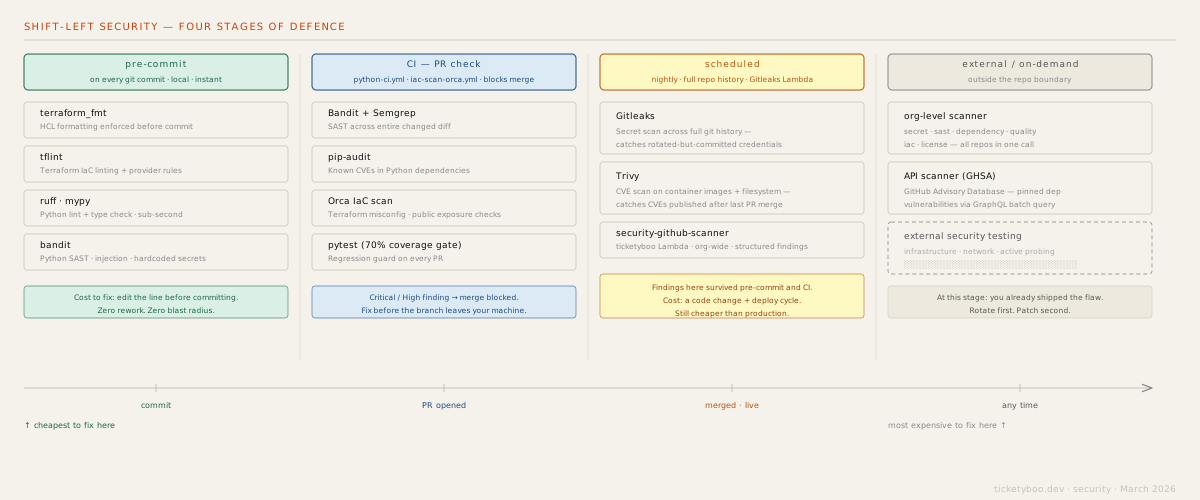
Stage 1: pre-commit
Pre-commit hooks run locally on every git commit. They have no network dependency,
no queue, no CI minutes. If they fail, the commit is rejected before it leaves the developer's machine.
The hooks configured in this stack:
| Hook | What it catches |
|---|---|
terraform_fmt |
HCL formatting — enforced before the file is committed, not after review |
tflint |
Terraform IaC linting — provider-specific rules, deprecated arguments, type errors |
ruff |
Python lint — style, unused imports, obvious bugs — sub-second on any codebase |
mypy |
Python type checking — catches type mismatches before runtime |
bandit |
Python SAST — injection patterns, hardcoded passwords, shell=True, weak crypto |
The combined runtime for all five hooks on a typical Python + Terraform repo is under three seconds. There is no reason not to run them.
Stage 2: CI PR check
Two workflows run on every pull request: python-ci.yml (application security)
and iac-scan-orca.yml (infrastructure security). Critical or High findings block
the merge. Medium and Low findings annotate the PR without blocking.
The PR check adds tools that are too slow for pre-commit but fast enough for CI:
| Tool | What it catches |
|---|---|
| Semgrep | Cross-language SAST with community rulesets — injection, auth bypass, misuse of crypto APIs |
| pip-audit | Known CVEs in Python dependencies, cross-referenced against PyPI Advisory Database |
| Orca IaC scan | Terraform misconfiguration — public exposure, missing encryption, overpermissive IAM |
| pytest (70% gate) | Regression guard — not security-specific, but a regression that bypasses auth is a security issue |
Stage 3: scheduled scans
Some security problems cannot be caught at commit or PR time. Two categories matter here:
Secrets committed and later rotated. A developer commits an AWS key, realises, rotates it, and removes it in a follow-up commit. The secret is gone from HEAD — but it is still in git history. Gitleaks scans the full commit history on a nightly schedule and will find it. The rotation was correct; the history still needs to be reviewed and optionally rewritten.
CVEs published after the last PR merge. Your dependency on
requests==2.28.1 was clean when you merged six weeks ago. A CVE was published
last Thursday. No code has changed, so no PR check would have caught it. Trivy runs nightly
against the live filesystem and container images, and will surface newly-published
vulnerabilities against unchanged dependencies.
The security-github-scanner Lambda — deployed in this stack — runs both
Gitleaks and Trivy on a schedule across the full GitHub organisation, writing structured
findings to DynamoDB for review.
Secret detection: the highest-value scan
Hardcoded credentials are the single highest-return security scan. Automated scanners harvest leaked credentials from GitHub within minutes of a commit — there are bots running continuously watching for AWS key patterns, GitHub tokens, Stripe keys, and more.
The patterns running in the ticketyboo scanner (api/layers/secret.py):
# api/layers/secret.py — pattern registry (name, compiled_re, severity)
_PATTERNS = [
    ("AWS Access Key",  re.compile(r"AKIA[0-9A-Z]{16}"),                     "critical"),
    ("AWS Secret Key",  re.compile(r"(?i)aws_secret_access_key\s*[=:]\s*['\"]?[A-Za-z0-9/+=]{40}"), "critical"),
    ("Private Key",     re.compile(r"-----BEGIN (RSA|EC|OPENSSH|DSA|PGP) PRIVATE KEY"), "critical"),
    ("Database URL",    re.compile(r"(?i)(postgres|mysql|mongodb|redis)://[^\s'\"]+:[^\s'\"]+@"),  "critical"),
    ("Generic API Key", re.compile(r"(?i)(api[_-]?key|apikey)\s*[=:]\s*['\"][A-Za-z0-9_\-]{16,}['\"]"), "high"),
    ("Generic Token",   re.compile(r"(?i)(token|secret|auth)\s*[=:]\s*['\"][A-Za-z0-9_\-]{16,}['\"]"),   "high"),
    ("JWT Token",       re.compile(r"eyJ[A-Za-z0-9_-]{10,}\.[A-Za-z0-9_-]{10,}\.[A-Za-z0-9_-]{10,}"),   "high"),
    ("Webhook URL",     re.compile(r"https://hooks\.(slack|discord)\.com/[^\s'\"]+"),                     "high"),
]

# Plain regex isn't enough — high-entropy strings catch keys that don't match patterns
_ENTROPY_THRESHOLD = 4.5   # bits/char
_ENTROPY_MIN_LENGTH = 16

# False positives suppressed by placeholder pattern
_PLACEHOLDER_RE = re.compile(
    r"(?i)(your[_-]?api[_-]?key|REPLACE_ME|xxx+|placeholder|example|changeme|TODO)"
)

def _shannon_entropy(s: str) -> float:
    freq: dict[str, int] = {}
    for ch in s:
        freq[ch] = freq.get(ch, 0) + 1
    length = len(s)
    return -sum((c / length) * math.log2(c / length) for c in freq.values())
Entropy analysis catches secrets that don't match known patterns — randomly-generated tokens,
session keys, internal service credentials. A 32-character base64 string assigned to a variable
named auth with entropy > 4.5 bits/char gets flagged even if it doesn't look like
any known credential format. Matched values are redacted (first 4 + last 4 chars) before storage —
the finding records the location, not the secret itself.
SAST: AST-based detection in Python
Regex-based SAST has a false-positive problem: it can't tell the difference between
a string that looks dangerous and code that is dangerous. The scanner uses Python's
ast module to parse Python files and inspect the actual call graph:
# api/layers/sast.py — command injection check via AST walk
def _check_command_injection(node: ast.AST) -> Optional[str]:
    """Flag subprocess/os calls with shell=True."""
    if isinstance(node, ast.Call):
        func = node.func
        func_name = ""
        if isinstance(func, ast.Attribute):
            func_name = func.attr
        elif isinstance(func, ast.Name):
            func_name = func.id
        if func_name in ("system", "popen", "run", "call", "Popen", "check_output"):
            for kw in node.keywords:
                if kw.arg == "shell" and isinstance(kw.value, ast.Constant) \
                        and kw.value.value is True:
                    return "shell=True enables command injection if user input is passed"
    return None

# SQL injection: detect f-strings or concatenation inside .execute()
def _check_sql_injection(node: ast.AST) -> Optional[str]:
    if isinstance(node, ast.Call):
        func = node.func
        if isinstance(func, ast.Attribute) and func.attr == "execute":
            if node.args:
                arg = node.args[0]
                if isinstance(arg, (ast.JoinedStr, ast.BinOp)):
                    return "String-formatted SQL query is vulnerable to injection"
    return None

# Checks are registered with name + severity, run against every node in the AST
_AST_CHECKS = [
    ("Command Injection",          "critical", _check_command_injection),
    ("SQL Injection",              "critical", _check_sql_injection),
    ("Insecure Deserialization",   "high",     _check_insecure_deser),
    ("Cross-Site Scripting (XSS)", "high",     _check_xss),
    ("Path Traversal",             "high",     _check_path_traversal),
    ("Weak Cryptography",          "medium",   _check_weak_crypto),
]
AST walking catches things that a regex can't: shell=True as a keyword argument
regardless of spacing or quoting, f-strings inside .execute() regardless of variable
names, pickle.loads() vs json.loads(). For JavaScript, Go, and Ruby —
where Python's ast module doesn't apply — the scanner falls back to regex patterns.
Parse failures on Python files also fall back to regex.
IaC security scanning
Infrastructure as Code files (Terraform, CloudFormation, Pulumi) are often more security-critical than application code, but receive less scrutiny. Common patterns:
Public S3 buckets
Any Terraform resource with acl = "public-read" or
block_public_acls = false without explicit data classification sign-off.
Default should be private. Public delivery should use CloudFront OAC, not open ACLs.
Unbounded Lambda concurrency
A Lambda with no reserved_concurrent_executions set can exhaust your
account's total concurrency (default: 1000). On Free Tier, unexpected traffic
can consume your monthly compute allocation before you notice.
Missing encryption
DynamoDB tables, S3 buckets, and SQS queues without server-side encryption enabled. SSE-S3 (AES-256) is free and should be the default for all storage resources.
Stage 4: org-level scanning and the OWASP Top 10
The GitHub API's /orgs/{org}/repos endpoint returns all repositories in an
organisation (paginated). With an authenticated PAT (5,000 requests/hour), you can
enumerate all repos, fetch their file trees, and download specific files for analysis —
all within the free tier of the GitHub API.
# Enumerate all repos in an org and scan each
import asyncio
from github_client import GitHubClient
from scanner import scan_repository

async def scan_org(org: str, pat: str) -> list[dict]:
    client = GitHubClient(pat)
    repos = client.list_org_repos(org)  # handles pagination

    # Scan up to 10 repos concurrently
    semaphore = asyncio.Semaphore(10)

    async def scan_one(repo):
        async with semaphore:
            return await scan_repository(
                repo_url=f"https://github.com/{org}/{repo['name']}",
                scan_id=generate_scan_id(),
            )

    return await asyncio.gather(*[scan_one(r) for r in repos])
The OWASP Top 10 is not a checklist — it's a risk taxonomy. Each category maps to a set of detectable code and configuration patterns covered by the scanner layers:
| OWASP Category | Scanner layer | What it checks |
|---|---|---|
| A01: Broken Access Control | iac.py |
S3 buckets with public ACLs, missing IAM conditions, no resource policies |
| A02: Cryptographic Failures | secret.py |
Hardcoded secrets, HTTP (not HTTPS) endpoints, weak cipher configs |
| A03: Injection | sast.py |
String concatenation in SQL queries, shell=True in subprocess calls |
| A05: Security Misconfiguration | iac.py |
Debug mode enabled, default credentials, missing security headers |
| A06: Vulnerable Components | dependency.py |
Dependencies with known CVEs via GHSA GraphQL batch query |
| A09: Logging Failures | quality.py |
Missing audit logging, print() in production, no structured log format |
This separation — fast targeted scan on PR, full org scan on schedule — keeps CI times under 60 seconds while still catching the full range of findings over time.
SECRET_KEY assignment flagged as a potential secret leak.
The scanner also detected missing SECURITY.md and CODEOWNERS
across multiple repositories in the demo set.
Scan your repo →
Working on something like this?
Fractional CTO and transformation leadership for situations that aren't working. Bring a problem — thirty minutes, no obligation.
Bring a problem → or scan a repo first →